Introduction
What is a Data Stream? Data Streams track the specific set of events in a dataflow from the Run3tv application. They are one to one sources of information from your application (applist) to DatastreamID. Each Data Stream contains a designated Data StreamID called Measurement ID
Create a Framework Data StreamID
What is a framework Data Stream? Framework is defined as a set of structures to initialize the application. You can create a Data Stream called Framework to track the framework events associated such as loading, loaded, IOT agents. In our case, we have consolidated all these stages in to one case displaying framework in GA4.
Framework Data streamID is required so that the Google Tag Manager can be configured with the correct setting
-
Sign in to Google Analytics. In the bottom left corner, click on the Settings gear icon.
-
Click on Admin ,we can see Accounts with properties. Then, choose the specific Account .
-
In properties, select Data Streams, Click on Add stream, this will display choose a platform .
.png?width=670&height=363&name=Screenshot%20(26).png)
.png&size=168445&width=1360&height=736&alt=)
-
The platform selectors indicate various platforms, such as Web, Android App, IOS App for determining from which platform data should be collected.
.png&size=215103&width=1440&height=810&alt=)
-
In our case, Select Web . A web stream setup screen appears to provide URL and Stream Name .
-
Create a stream URL: framework-<version>.<bespoke-domain-name> (e.g. framework-1.9.0.prod.run3tv.org)
-
Create a stream Name: framework-<version>
-
Click on Create stream to generate MEASUREMENT ID.
.png?width=670&height=377&name=Screenshot%20(29).png)
.png&size=296655&width=1440&height=810&alt=)
How to Add additional Data StreamIDs
Introduction
You can create additional one to one sources of information from your application and link DatastreamIDs to applist.
e.g In our case , we have created different data streams to track the data from different applications.
Trigger1, Trigger2, Station-1, Station-2, aeat, leadgen, leadgen-cta, ga-test, pac-man, Run3tv-exception, field-test ,dai-google-pre are some of the datastreams which can be linked to applist. Use the same name the APPLIST.JSON to be consistent.
-
To connect : You must have at least Read & Analyze permission to the Google Analytics 4 property or Universal Analytics view to which you connect.
-
Sign in to Google Analytics › analytics › web.
-
On the top left, we can see All account/a3fa.
-
Click on All account/a3fa and select the property of your choice.
-
In the bottom left corner, click on the Settings gear icon.
.png?width=670&height=392&name=Screenshot%20(86).png)
.png&size=87143&width=1220&height=714&alt=)
-
Click on Data Streams.
-
On the Data Streams screen, Click on Add stream, this will display the list of data streams.
-
Select web, a pop up is displayed press yes on popup.
-
Enter url of your choice and provide stream name. Click on create stream .
.png?width=670&height=328&name=Screenshot%20(90).png)
.png&size=186516&width=1379&height=676&alt=)
E.g stream name(trigger1), url (trigger1.dev4.a3fa.com)
stream name(trigger2), url (trigger1.dev4.a3fa.com)
stream name (station-1), url (station-1.dev4.a3fa.com)
stream name(station-2), url (station-2.dev4.a3fa.com)
10. Copy the MEASUREMENT ID(G-KCG1B7DH83).
.png?width=670&height=260&name=Screenshot%20(91).png)
.png&size=140709&width=1358&height=527&alt=)
Turn off Enhanced Measurement which automatically measures interactions and content on your site

Linking Data StreamID to your Application in AppsList.json
Instructions
11. Open your source code, under public/london/applist.json search for above code
"trigger-1": {
"appRoot": "/run3tv-common/apps/triggers",
"appEntry": "/cta.html",
"properties": {
"ga-id": "G-EHPT99RJF9",
"linkApp": "STATION-1",
                    "hidden": false,
                    "timeout": 5,
"img": "/london/Station-1/trigger/img/img.png"
}
},
and replace the ga-id with the MEASUREMENT ID copied before.
"trigger-1": {
"appRoot": "/run3tv-common/apps/triggers",
"appEntry": "/cta.html",
"properties": {
"ga-id": "G-DDJQ2TR9K4",
"linkApp": "STATION-1",
"hidden": false,
"timeout": 5,
"img": "/london/Station-1/trigger/img/img.png"
}
},
Only for Q-bar application:
Open your source code, under public/london/Station-3/q-bar/dynamic/menu/config.json.
Replace the “ga-id“ value with the MEASUREMENT ID copied before.
12. Similarly, add more data streams station 1, trigger2, station 2, lead gen and replace the ga-id with the measurement id.
How to Delete streams
-
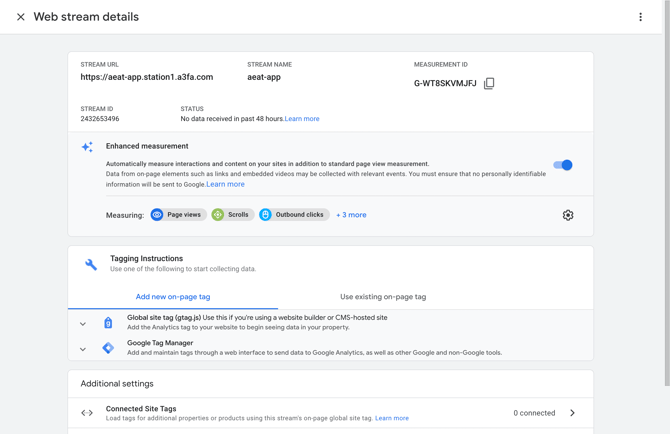
To delete a stream, Under Data stream screen select the stream you want to delete and select the right arrow icon, web stream details screen is displayed.

-
On the top right corner we can see three dots, click on three dots and delete the stream.
