When a new channel is reported via the framework the system logs that information in the channel management system and is pre-populated with owner metadata if we have it.
A new channel is added to the channel management system if we detect a new combination of Callsign & Global Service ID (the Channel Identifiers) in the data.
We are aware that due to differences in how the HTML Entry page Location Descriptor (HELD), receiver and applications are configured there may be multiple instances of the same channel reported in the data.
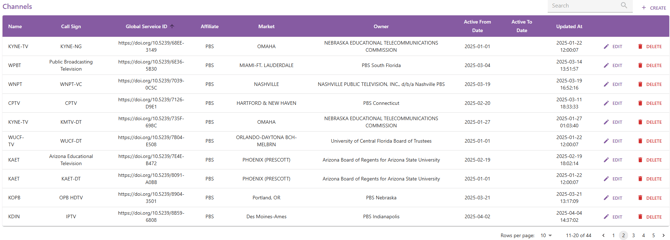
Name: The reporting name used for this channel. Administrators can update the channel name for reporting consistency. If broadcast channels are reporting multiple Channel Identifiers (GSID & Call Sign) giving them a common name will aggregate the results in the dashboard view under that common name.
Call Sign: Reported by the Run3TV framework and based on the HELD, receiver API or application configuration data. This field may be reported with different values for the same broadcast channel due to inconsistencies in how the framework receives the reported values
Global Service ID: Channel identifier from the HELD. This field cannot be edited
Affiliate: Network affiliate information for the callsign taken from the FCC database
Market: The broadcast market associated with the channel, taken from the FCC database
Owner: The broadcaster managing the channel metrics in the dashboard. This is populated from the FCC database by default
Active From Date: The date the channel identifiers were first logged by the Run3TV framework
Active To Date: Channel owners can set this field to show a callsign has been changed and is no longer in use.
Channel administrators can group mis-reported channel Identifiers for reporting purposes by editing the Channel Name field to be consistent across all reported combinations of the channel identifiers.
🛎️Support
If you believe the information shown in these reports is incorrect, or is missing data/channels/applications please raise a support request at https://developer.run3tv.com/tickets-view and include as many details as possible on the error.