Introduction:
This section introduces to setup Google Tag Manager which is a tag based management system .
To connect : You must have at least Read & Analyze permission to the Google Tag Manager Accounts.
Create a new account and container:
-
Create an account, or use an existing account, at Google Tag Manager. A new container is created by default, and you can create additional containers within each account.
-
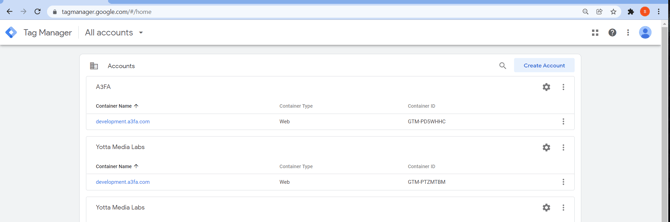
In Tag Manager, Under Accounts, Click Create account.

-
Enter an account name and country, Tick to indicate whether you'd like to share data anonymously with Google and others.

-
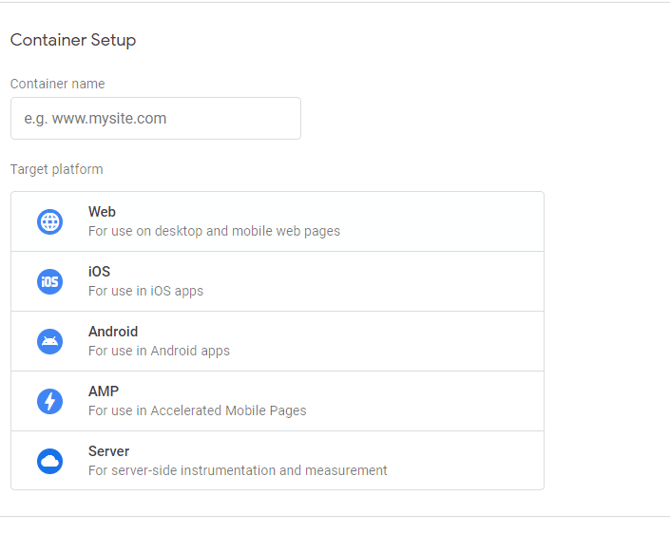
Enter a descriptive container name and select the type of content: Web

-
Click Create.
-
Accept the data processing terms at the bottom of the page and Click yes at the top right
How to Add GTM container ID in the gtm.js file
Edit the gtm.js file to install Google Tag Manager in your application:
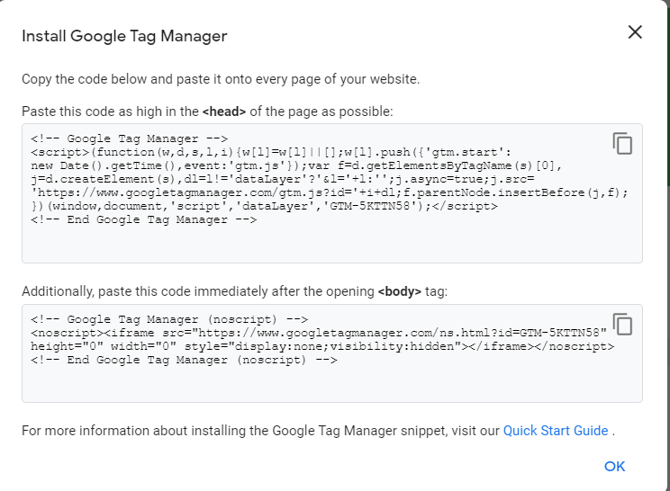
After creating a new account and container, a code snippet appears on screen which looks like:

-
Copy the ID from the code snippet. (in the previous image: GTM-5KTTN58)
-
Replace the ID in File : \public\run3tv-common\gtm.js and save the file.
Eg: gtm.js default file
function gtag(){dataLayer.push(arguments)}function uuidv4(){for(var t="",e=0,a=4294967295*Math.random()|0;e++<36;){var x="xxxxxxxx-xxxx-4xxx-yxxx-xxxxxxxxxxxx"[e-1],n=15&a;t+="-"==x||"4"==x?x:("x"==x?n:3&n|8).toString(16),a=e%8==0?4294967295*Math.random()|0:a>>4}return t}var date;function getDate(){var t=new Date,e=Math.floor(t.getTime()/1e3),a=t.getTimezoneOffset();return a>0?e-=60*a:e+=-1*a*60,{clientDT:Math.floor(t.getTime()/1e3),clientDTZ:e}}!function(t,e,a,x,n){t[x]=t[x]||[],t[x].push({"gtm.start":(new Date).getTime(),event:"gtm.js"});var r=e.getElementsByTagName(a)[0],o=e.createElement(a);o.async=!0,o.src="https://www.googletagmanager.com/gtm.js?id=GTM-569WV6W",r.parentNode.insertBefore(o,r)}(window,document,"script","dataLayer"),window.dataLayer=window.dataLayer||[],gtag("js",new Date);
gtm.js file after replacing ID
function gtag(){dataLayer.push(arguments)}function uuidv4(){for(var t="",e=0,a=4294967295*Math.random()|0;e++<36;){var x="xxxxxxxx-xxxx-4xxx-yxxx-xxxxxxxxxxxx"[e-1],n=15&a;t+="-"==x||"4"==x?x:("x"==x?n:3&n|8).toString(16),a=e%8==0?4294967295*Math.random()|0:a>>4}return t}var date;function getDate(){var t=new Date,e=Math.floor(t.getTime()/1e3),a=t.getTimezoneOffset();return a>0?e-=60*a:e+=-1*a*60,{clientDT:Math.floor(t.getTime()/1e3),clientDTZ:e}}!function(t,e,a,x,n){t[x]=t[x]||[],t[x].push({"gtm.start":(new Date).getTime(),event:"gtm.js"});var r=e.getElementsByTagName(a)[0],o=e.createElement(a);o.async=!0,o.src="https://www.googletagmanager.com/gtm.js?id=GTM-5KTTN58",r.parentNode.insertBefore(o,r)}(window,document,"script","dataLayer"),window.dataLayer=window.dataLayer||[],gtag("js",new Date);