This set of dashboards show metrics for all devices running framework versions older than 2.4. This data was previously provided using Looker dashboards and are replicated here.

These dashboards are provided for historical reporting only as broadcasters are encouraged to update their applications to run on the 2.4 version of the framework.
Setting Reporting Periods
Reporting periods can be selected from the date range selector on the top right of the page. By default the dashboard will display the last 7 days of data.
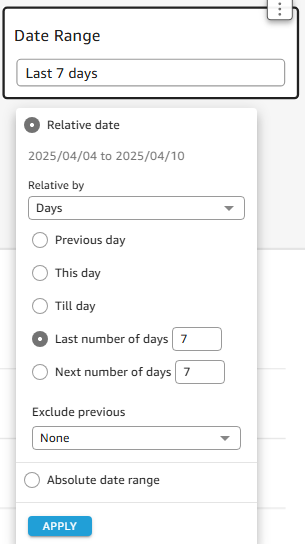
To extend the reporting range make changes to the number of days in the "Last number of days" box, or change the relative reporting to weeks or months in the drop-down.
To accept the date range and refresh the data click the "APPLY" button.
The selected date range is persistent across all of the report views in this dashboard, changing it will update the graphs on all pages
💡Note: selecting a long date range can cause some graphs to time out before they are able to load all the data.
Reporting on a Specific Date Range
Choose "Absolute date range" from the drop-down
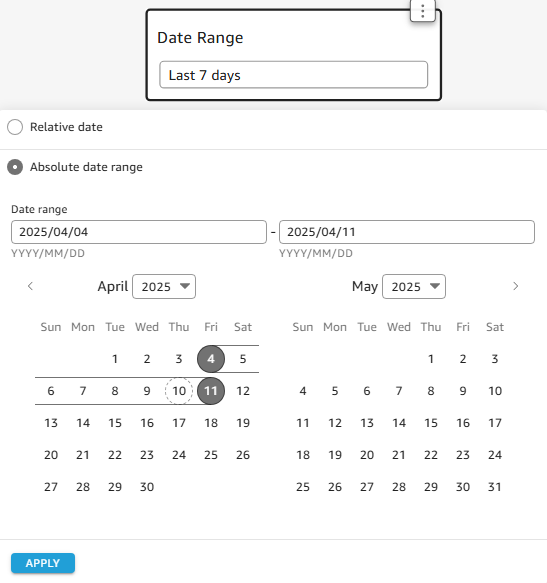
Click on the start date for your reporting period followed by a second click on the last day of the reporting period to modify the date range, you should see the range highlighted with black bars and grey circles indicating the start and end dates. Alternatively, enter the dates manually in the date range box above the calendar, the format is YYYY/MM/DD.
To accept the date range and refresh the data click the "APPLY" button.
The selected date range is persistent across all of the report views in this dashboard, changing it will update the graphs on all pages.